 Scroll Brake
•
Bloqueador cognitivo de aplicaciones para iOS y Chrome
Scroll Brake
•
Bloqueador cognitivo de aplicaciones para iOS y Chrome
Los límites estándar de tiempo de pantalla no funcionan. Este sí.
Scroll Brake crea una fricción consciente antes de que las apps adictivas te roben la concentración. Interrompe los hábitos automáticos en iPhone y Chrome sin depender de tu fuerza de voluntad.
Por qué fallan los límites comunes: el reflejo de los 15 minutos.
El botón «Ignorar límite durante 15 minutos» en iOS se ha convertido en un reflejo automático. Tu dedo lo pulsa antes de darte cuenta de que vas a perder otra hora viendo vídeos cortos.
pasa el usuario medio haciendo scroll infinito cada día
robadas por redes sociales y muros cada semana
perdidas al año que podrían dedicarse a metas reales
| Función | Límites estándar de iOS | Scroll Brake |
|---|---|---|
| Protección contra reflejos | Ninguna (se eluden con 1 toque) | La barrera matemática activa tu cerebro |
| Control de concentración | Estadísticas pasivas | Previene activamente el doomscrolling |
| Notificaciones | Notificaciones molestas | Concentración silenciosa |
| Privacidad | Almacenamiento local | 100% Privado (Screen Time API) |
¿Cómo romper el bucle?
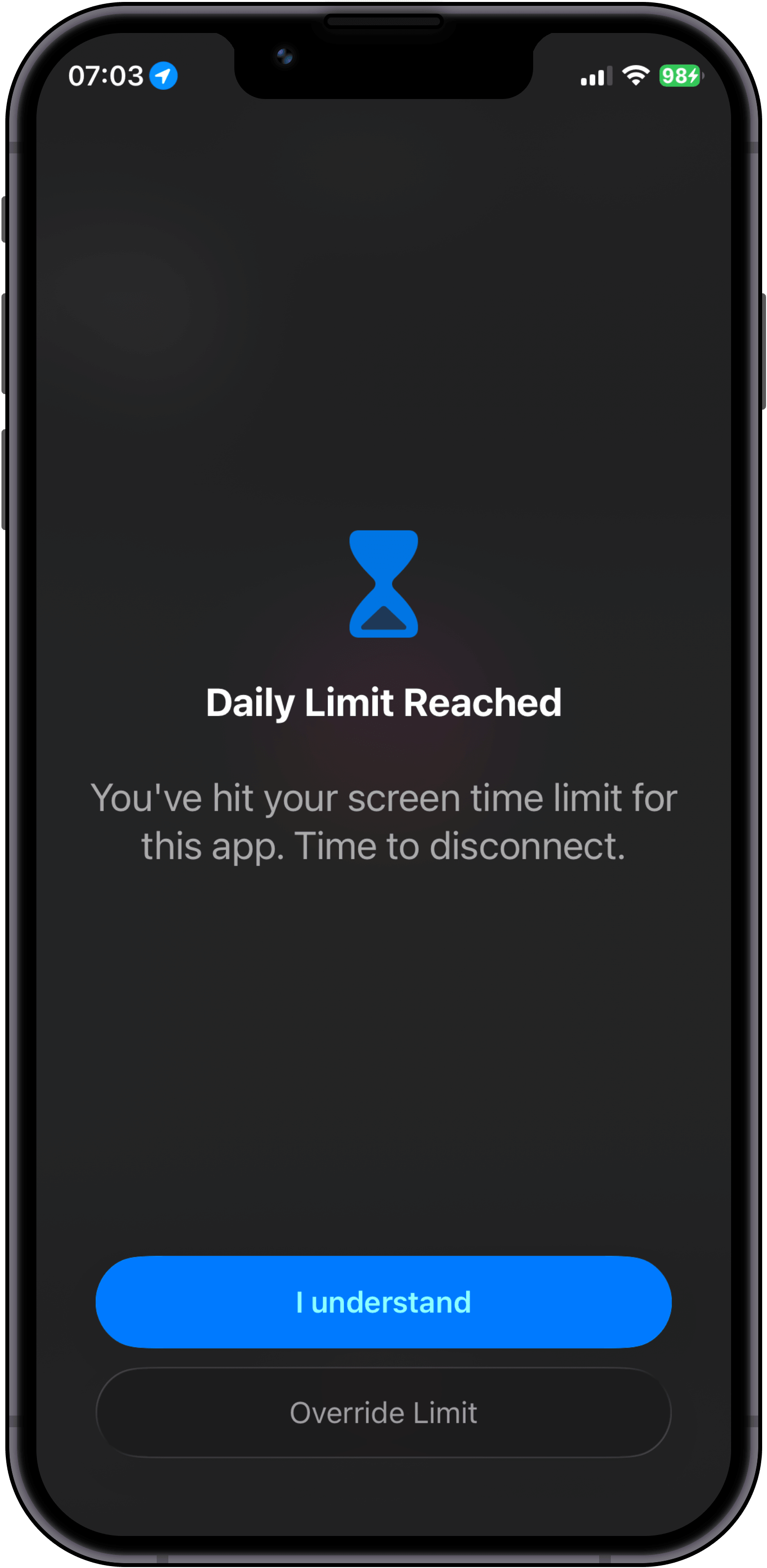
Install Scroll Brake and select specific apps or entire categories that steal your attention most.
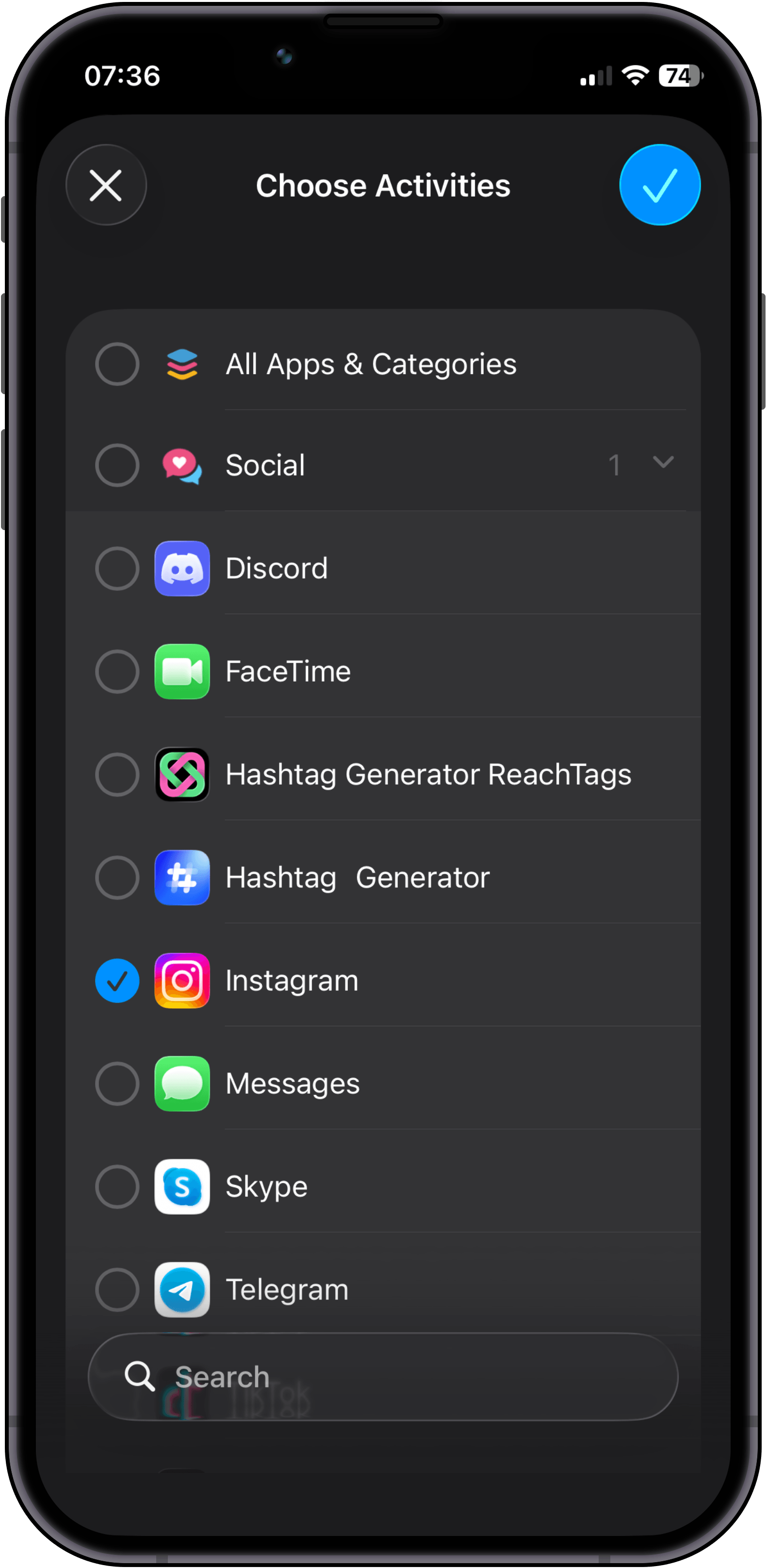
Configure your daily time budget. Tip: if you want a 30-minute daily limit, set 10-minute intervals and enable Strict Mode on the 3rd attempt.
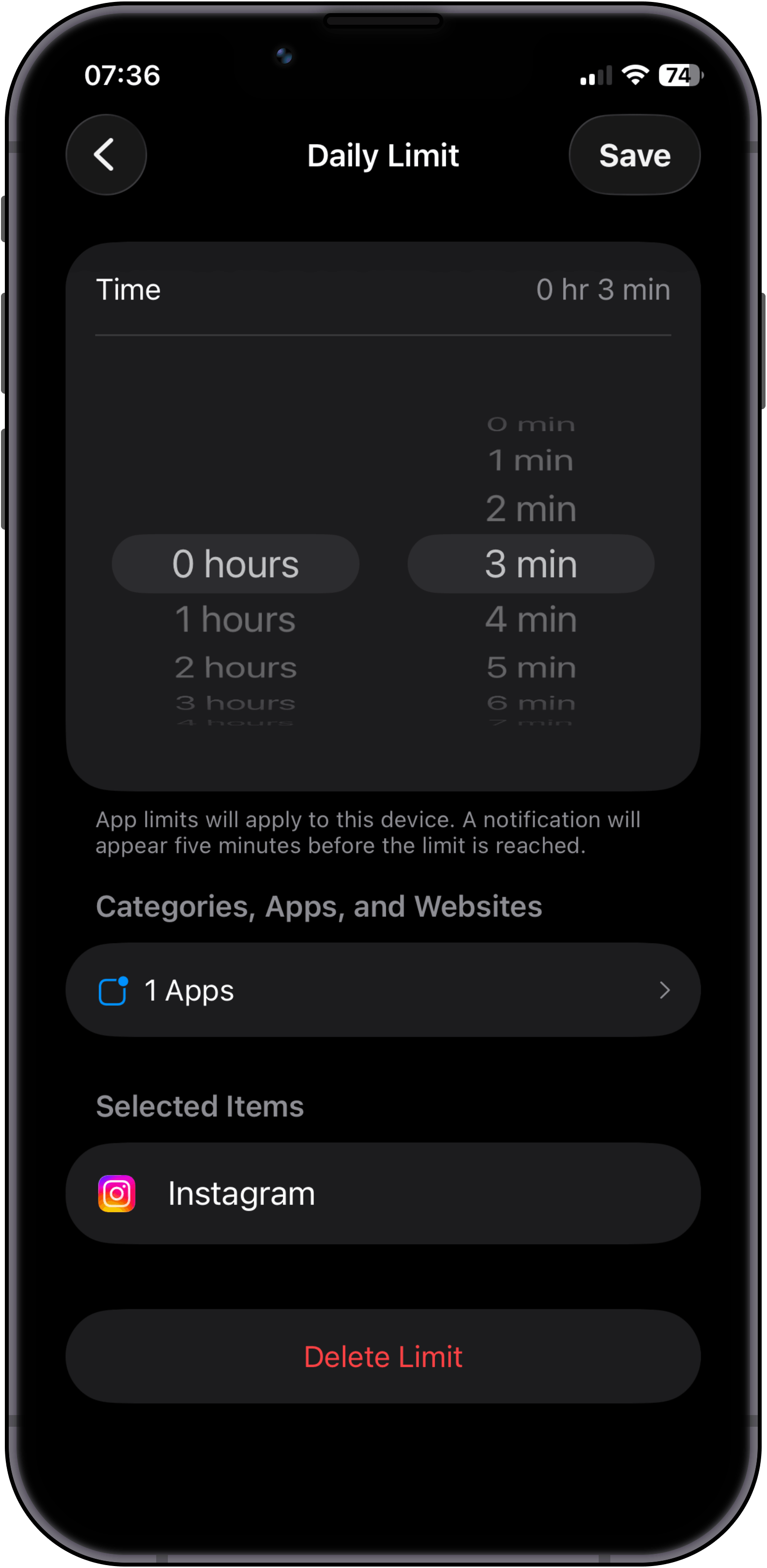
Use your apps as usual until the limit hits. Here you face the first fork: tap "Override limit" to solve a math problem, or tap "I understand" and put your phone down.
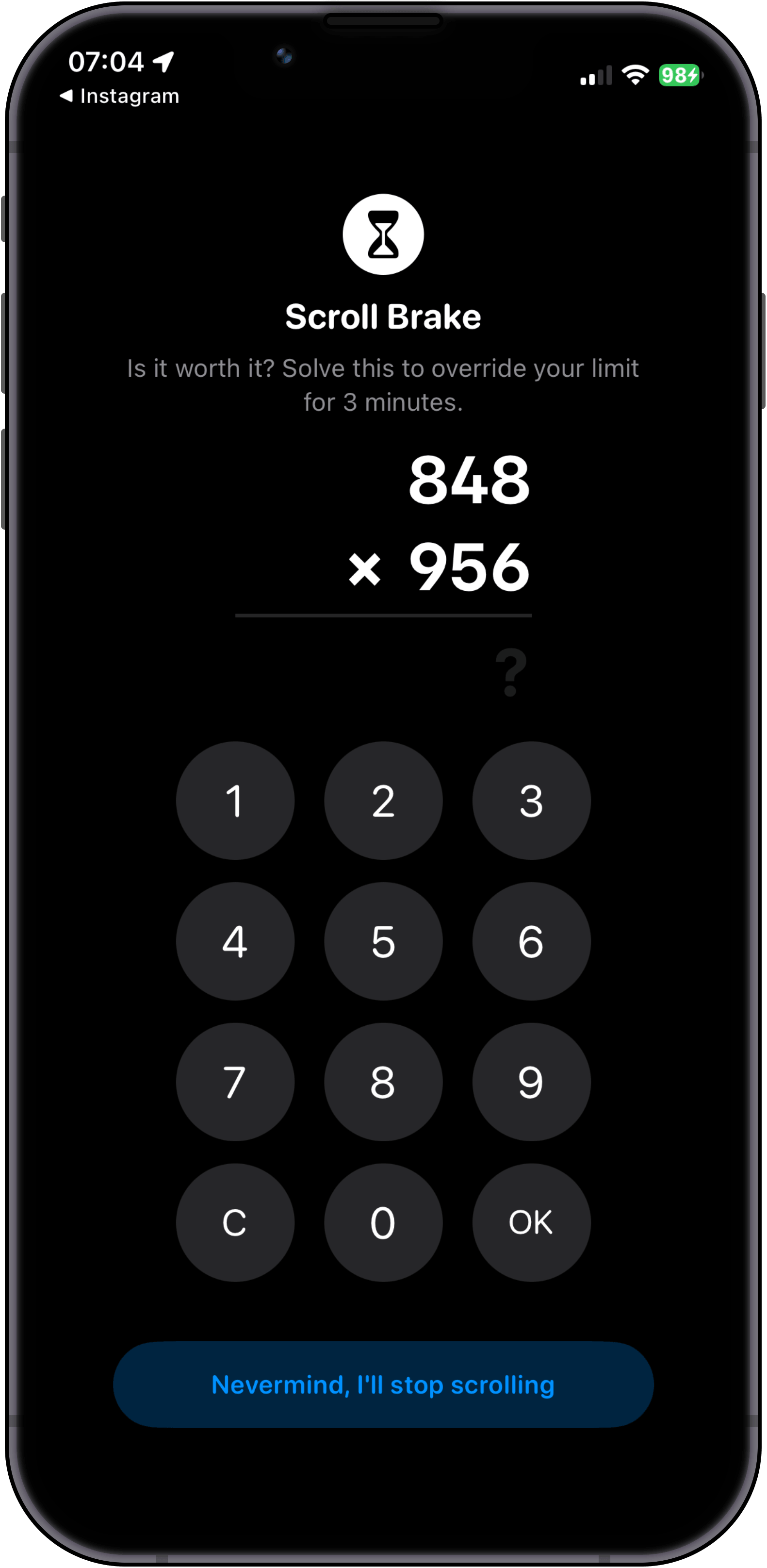
If you choose to keep scrolling, you must solve a mental math hurdle. Access stays locked until solved correctly, and switching to the Calculator app instantly reshuffles the problem.
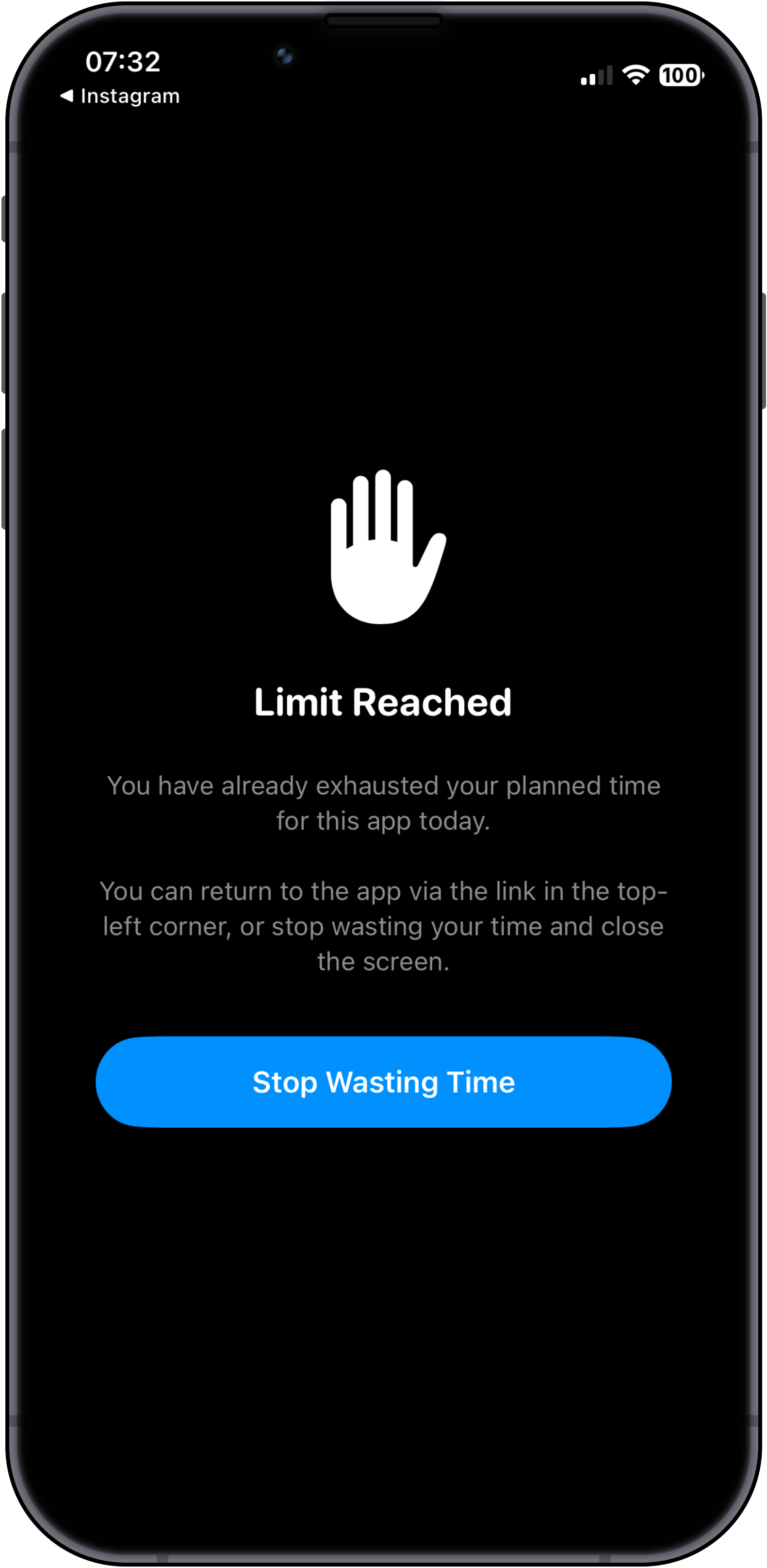
Even after solving correctly, we do not reward scrolling. You get a moment of clarity: return to the app via the top-left link, or tap "Stop Wasting Time" and walk away.
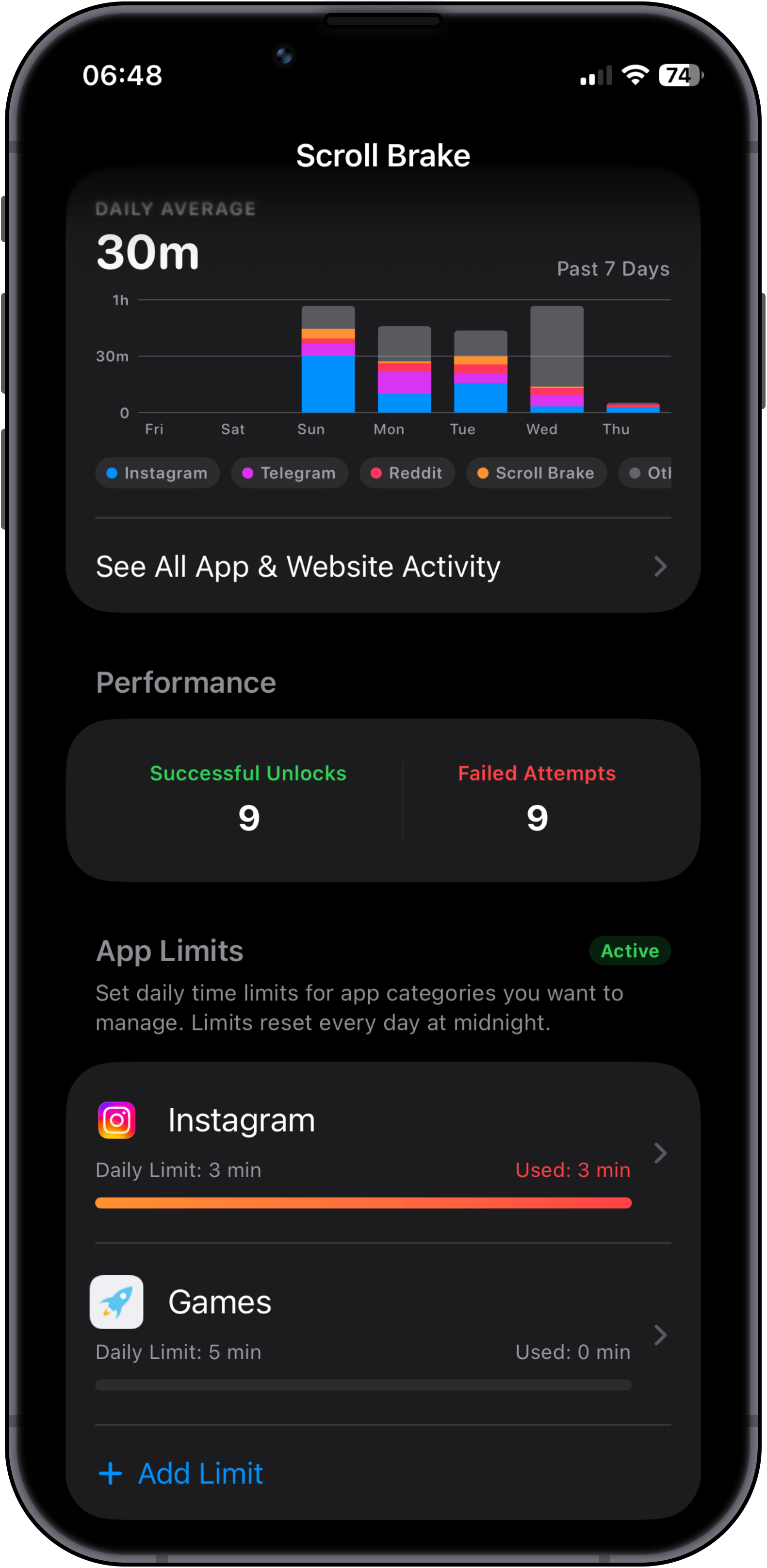
Controla tu tiempo de pantalla real y las tendencias semanales. Como Scroll Brake intercepta el control nativo de tiempo de uso de iOS, este historial detallado se mantiene de forma exclusiva y privada en nuestra aplicación.
Choose apps & categories
Install Scroll Brake and select specific apps or entire categories that steal your attention most.
Set limits & intervals
Configure your daily time budget. Tip: if you want a 30-minute daily limit, set 10-minute intervals and enable Strict Mode on the 3rd attempt.
Hit limit & decide
Use your apps as usual until the limit hits. Here you face the first fork: tap "Override limit" to solve a math problem, or tap "I understand" and put your phone down.
Solve math (no cheats)
If you choose to keep scrolling, you must solve a mental math hurdle. Access stays locked until solved correctly, and switching to the Calculator app instantly reshuffles the problem.
Mindfulness over dopamine
Even after solving correctly, we do not reward scrolling. You get a moment of clarity: return to the app via the top-left link, or tap "Stop Wasting Time" and walk away.
Private stats & progress
Controla tu tiempo de pantalla real y las tendencias semanales. Como Scroll Brake intercepta el control nativo de tiempo de uso de iOS, este historial detallado se mantiene de forma exclusiva y privada en nuestra aplicación.
The more often you get distracted, the harder it is to unlock.
The standard "Ignore limit for 15 minutes" button fails because your finger taps it on reflex. Scroll Brake breaks the autopilot: to unlock an app, you solve a quick math problem in your head. And if you keep opening it again and again during the day, the problems get tougher — until it's simply easier to put the phone down and get back to life.
Protection that grows throughout the day
A gentle wake-up first, then a reason to reflect, and on the third time — the phone goes back on the desk.
Gentle warm-up
A quick problem from the multiplication table. Just enough to snap you out of the trance and ask yourself: "Do I really need to scroll right now or am I just doing it out of habit?"
Time to think
Reaching for social media again? Now you need to add two-digit numbers. While you calculate in your head, your brain wakes up and the compulsive urge to scroll fades away.
“Nah, I'd rather go work”
When your brain realizes it has to do serious mental arithmetic just for another 15 minutes of feed, it gives up: "Not worth the effort, I'd rather do something useful." Loop broken.
Difficulty levels for everyone
Whether you dislike math or want an unbreakable barrier, pick whatever level feels right for you:
Junior
Level 1For anyone who dislikes math. Simple numbers up to 20 — just to look away from the screen.
Example challenges at this level
Student
Level 2 Default levelThe sweet spot for most: basic multiplication table that wakes up your mind in seconds.
Example challenges at this level
High Schooler
Level 3Two-digit mental math. A noticeable hurdle, but still comfortable to calculate.
Example challenges at this level
College Student
Level 4Requires real focus. Completely stops autopilot with numbers that carry over.
Example challenges at this level
Scholar
Level 5Serious mental arithmetic. Impossible to solve without putting all distractions aside.
Example challenges at this level
Professor
Level 6A hefty mental workout. After solving one of these, you won't feel like scrolling anymore.
Example challenges at this level
Grandmaster
Level 7The iron wall. You will almost certainly put your phone down and go back to what matters.
Example challenges at this level
3 warm-up questions to find your pace
No complicated setup. When you first open the app, 3 quick questions help pick your comfortable starting level. No grades or pressure — just finding what feels right for you.
Adapts to how you feel
Scroll Brake notices how easily you solve each challenge. If you breeze through, it keeps you on your toes. If you're tired in the evening or make a mistake, it softens up automatically.
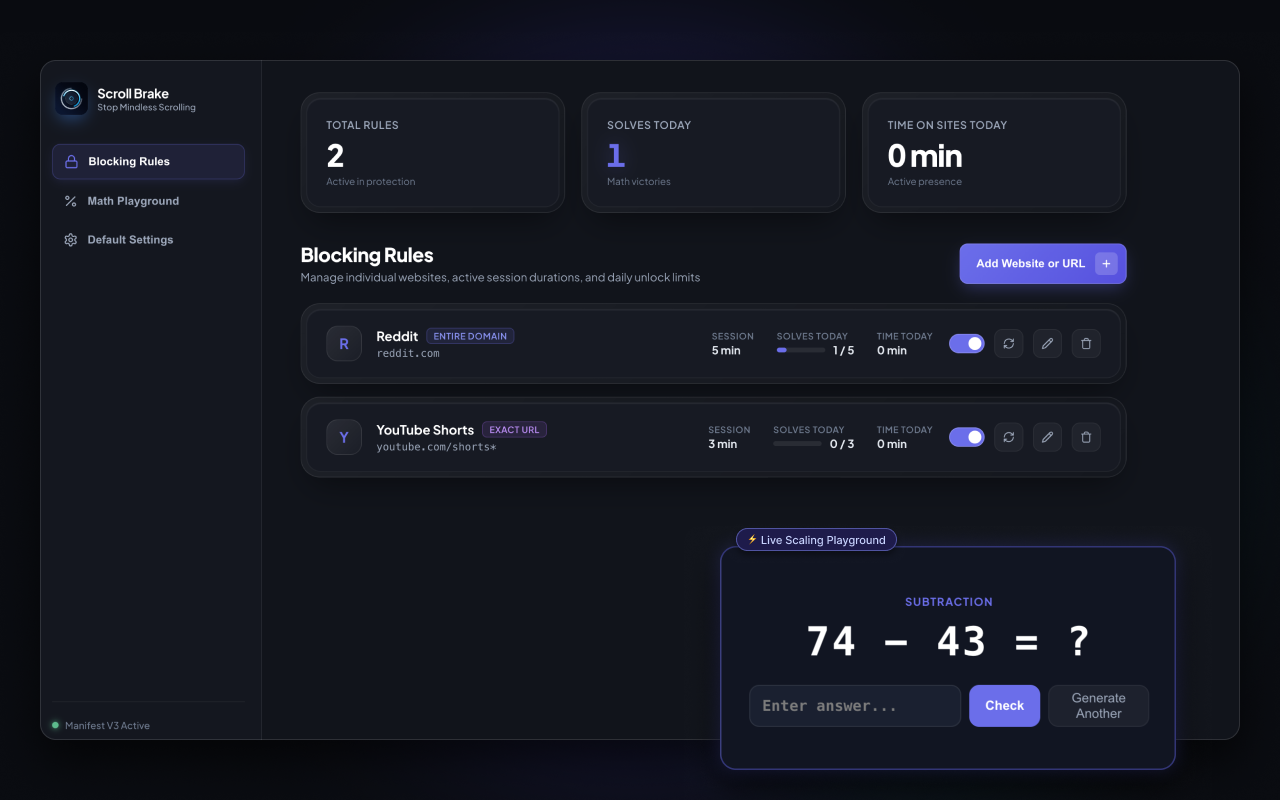
Detén el cambio compulsivo de pestañas. Ahora en tu navegador.
¿Cansado de abrir Twitter, Reddit o YouTube Shorts en piloto automático mientras trabajas? Scroll Brake lleva la fricción cognitiva al ordenador. Resuelve cálculos mentales para desbloquear sitios, mide el tiempo activo real y recupera la concentración profunda.
Math barrier before opening sites
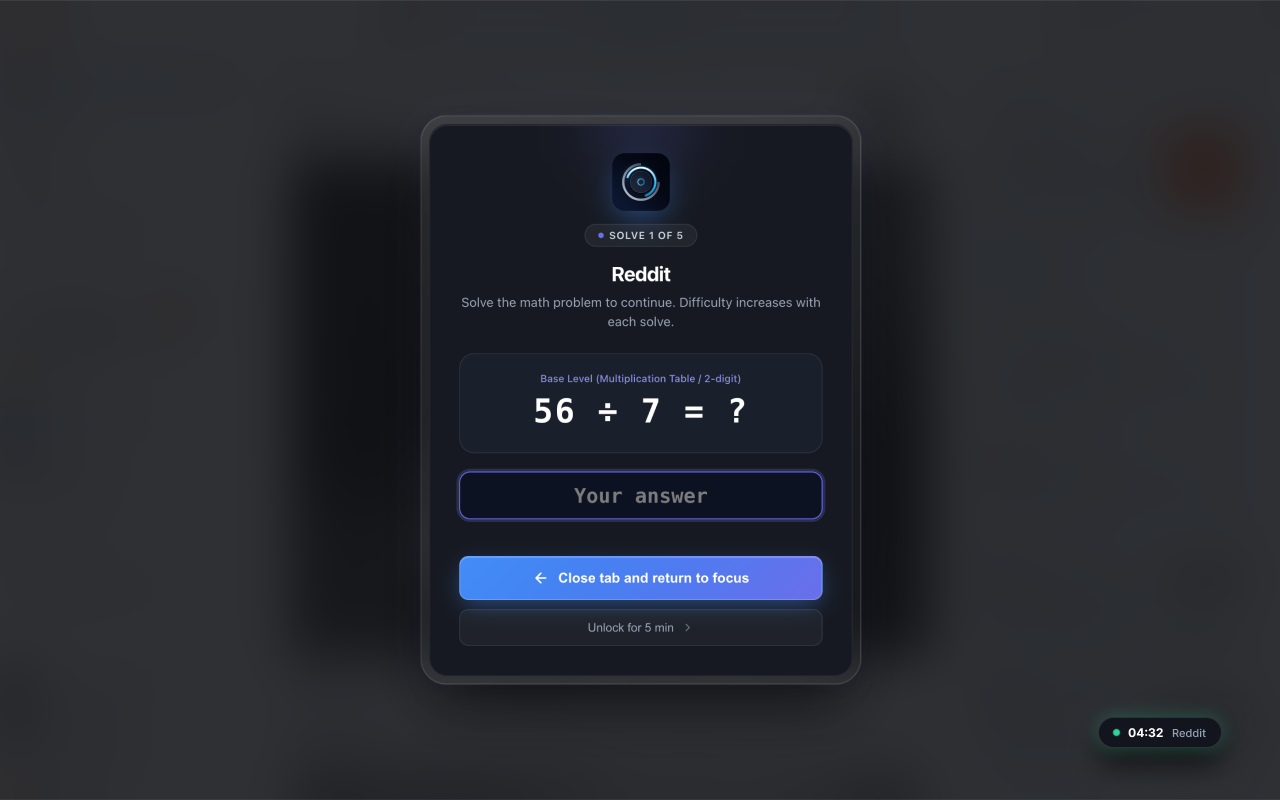
Solve a quick mental math problem to earn access. Every repeat unlock gets slightly tougher, snapping you out of autopilot before mindless browsing begins.
Seguimiento de tiempo activo real
El temporizador solo avanza cuando mueves activamente el ratón, escribes o haces scroll. Si cambias de pestaña o minimizas el navegador, la cuenta atrás se pausa al instante.
Bloqueo quirúrgico de URL y Shorts
Bloquea dominios completos o apunta de forma quirúrgica a feeds adictivos como youtube.com/shorts* manteniendo accesibles tutoriales, documentación y artículos de trabajo.
No Account Required
No accounts, emails, or cloud sync. All rules and counters stay 100% locally in chrome.storage.
Sin sobrecarga
JavaScript puro sin frameworks pesados. Consume prácticamente cero recursos de CPU y memoria.
Cuotas diarias de resolución
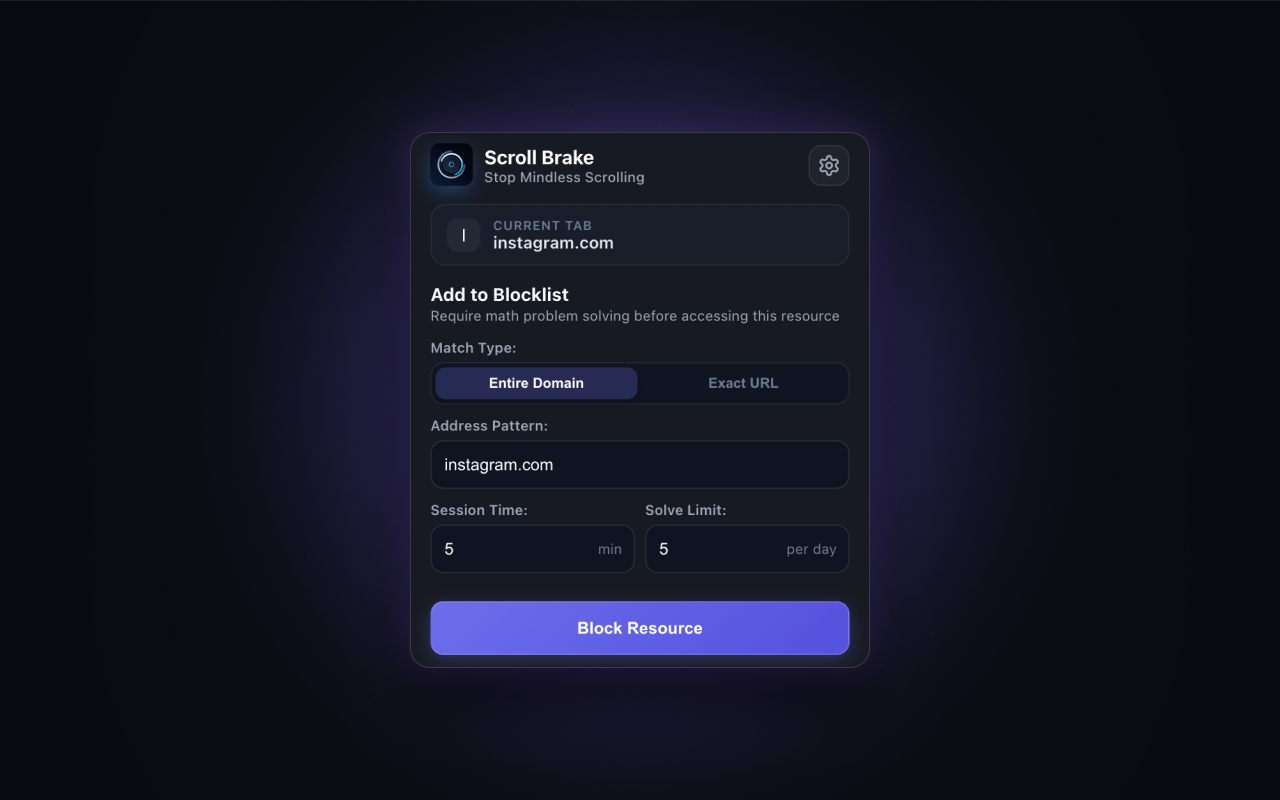
Establece límites estrictos como máximo 5 desbloqueos al día. Una vez alcanzados, el acceso queda bloqueado hasta medianoche.
Multinavegador
Compatibilidad total con Google Chrome, Brave, Microsoft Edge, Opera y Vivaldi.
¿Listo para recuperar el control de tu navegador?
Install the official extension from the Chrome Web Store in one click. No registration, no ads, no subscriptions.
Proven to break the scrolling loop
"The only app that actually forced me to put my phone down and go to sleep instead of scrolling until 2 AM."
Alex
Verified App Store User"I used to switch to Twitter and Reddit tabs every 5 minutes while coding without even realizing it. The mental arithmetic completely snapped me out of autopilot."
Dmitry K.
Software Engineer"Default iOS limits are useless because you click Ignore in 0.5s. Scroll Brake gives that essential 10-second friction to ask myself: do I really want this?"
Sarah M.
Medical StudentFrequently Asked Questions
Everything you need to know about Scroll Brake, cognitive friction, and privacy.
Deja de perder más de un mes de tu vida cada año haciendo scroll.
No registration required. Zero data collection. 100% private local storage.
Política de privacidad de Scroll Brake
Descubre cómo Scroll Brake gestiona tus datos y protege tu privacidad.