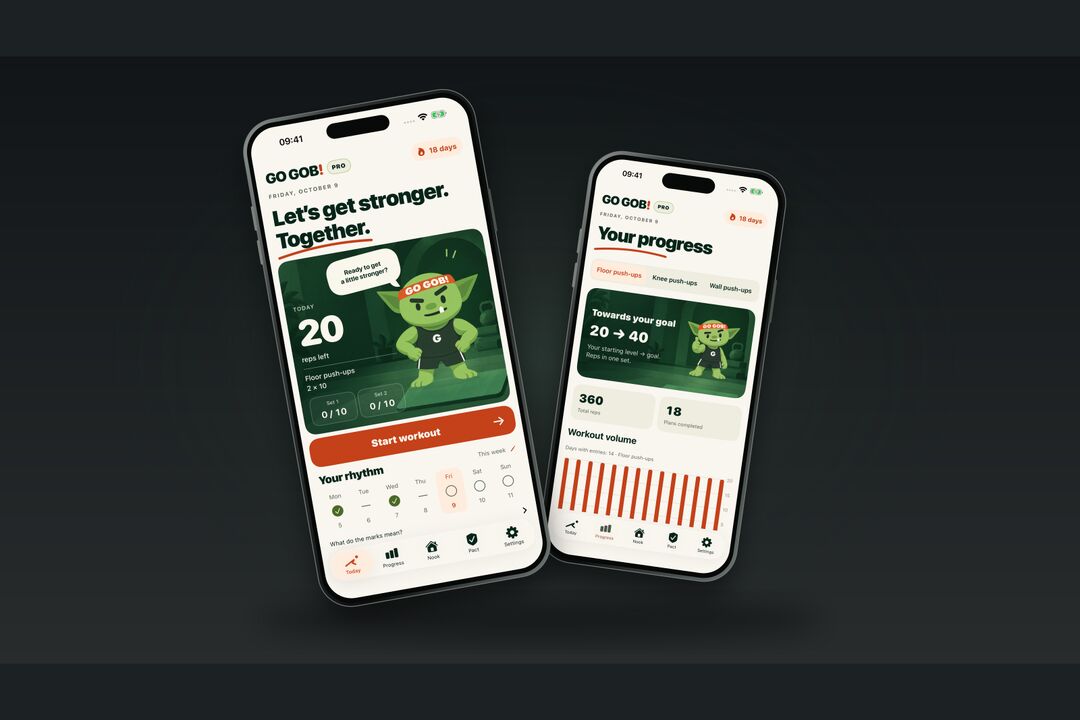
Wanting to do 40, 50 or 60 push-ups turned out to be different from actually training at home. The push-up counter app Go Gob! helps you remember your workouts, counts your reps and keeps a record of what you've done.
The goal is there. The workouts keep getting put off.
From the author's own experience:
I always wanted to be able to do 40, 50, 60 push-ups. But I'd forget, give up and only come back to the idea now and then. I never got into a routine. With Go Gob! I started doing push-ups myself and asked my friends to try it too. That's when I saw this thing actually works. It helps me train and keep track of my progress.
That probably sounds familiar: “I really should get started.” You want to train, but the next workout keeps slipping. A week later, you can't remember what you did last time. A month later, you're promising to start on Monday again.
In Go Gob! you can choose your training days ahead of time, turn on reminders and open a ready-made plan when it's time to exercise. The camera handles the counting, and your result goes into your history. Gob, a green goblin in a workout headband, is there to greet you and cheer you on.
A push-up counter app with a plan for your starting level
A goal of 60 push-ups doesn't tell you how many to do today. When you set up Go Gob!, you enter your current level, choose floor, knee or wall push-ups and set a goal. Your answers shape the starting plan. You can pick an easier variation or go straight to regular push-ups if you already do them.
The home screen shows today's exercise, sets and reps. If your plan calls for two sets of ten, for example, that's what you're working on now. The bigger goal can wait; today's workout is already clear. A rest timer runs between sets.
To avoid remembering your workout just as you're going to bed, you can set reminders for the days and time you choose. Notifications need your separate permission. Prefer training without them? You can leave them off.
After your workout, Go Gob! asks how the effort felt. The same number of reps can feel very different from one day to the next. Your feedback helps shape the next plan, and you decide whether to change the load.
The camera counts while you do the push-ups
Go Gob! automatically counts floor and knee push-ups. You can place your iPhone on the floor under your face or prop it up with your body in view. Check the position before you start: the app needs to see you moving.
“Was that seven, or am I on eight?” If you've lost count halfway through a set, you'll appreciate the voice feedback. Go Gob! calls out your reps, so you don't have to turn your head to check the screen. When the camera isn't convenient, you can record reps manually. Wall push-ups are always recorded manually.
The camera counts movement; it doesn't assess your form. A counted rep doesn't prove that you performed the exercise correctly. You still need to pay attention to how you're doing it.
Camera frames are processed on your iPhone. Video isn't recorded, and frames aren't sent to a server. There's no workout clip to film and upload, and your training records stay on the phone too. The app has no account requirement or ads.
A month later, you can see the workouts you've done
Right after a set, the main thing you remember might be feeling tired. A few days later, even the numbers get fuzzy. Go Gob! saves your results: the progress screen shows your accumulated reps, completed plans and the goal you're working toward.
After a break, for example, you can open your history and check your earlier sessions. You don't have to guess what you used to do. If you train regularly, the records let you see how that work adds up over time.
Floor, knee and wall push-ups are tracked separately. If you switch between variations, you can follow each one and compare sessions of the same exercise.
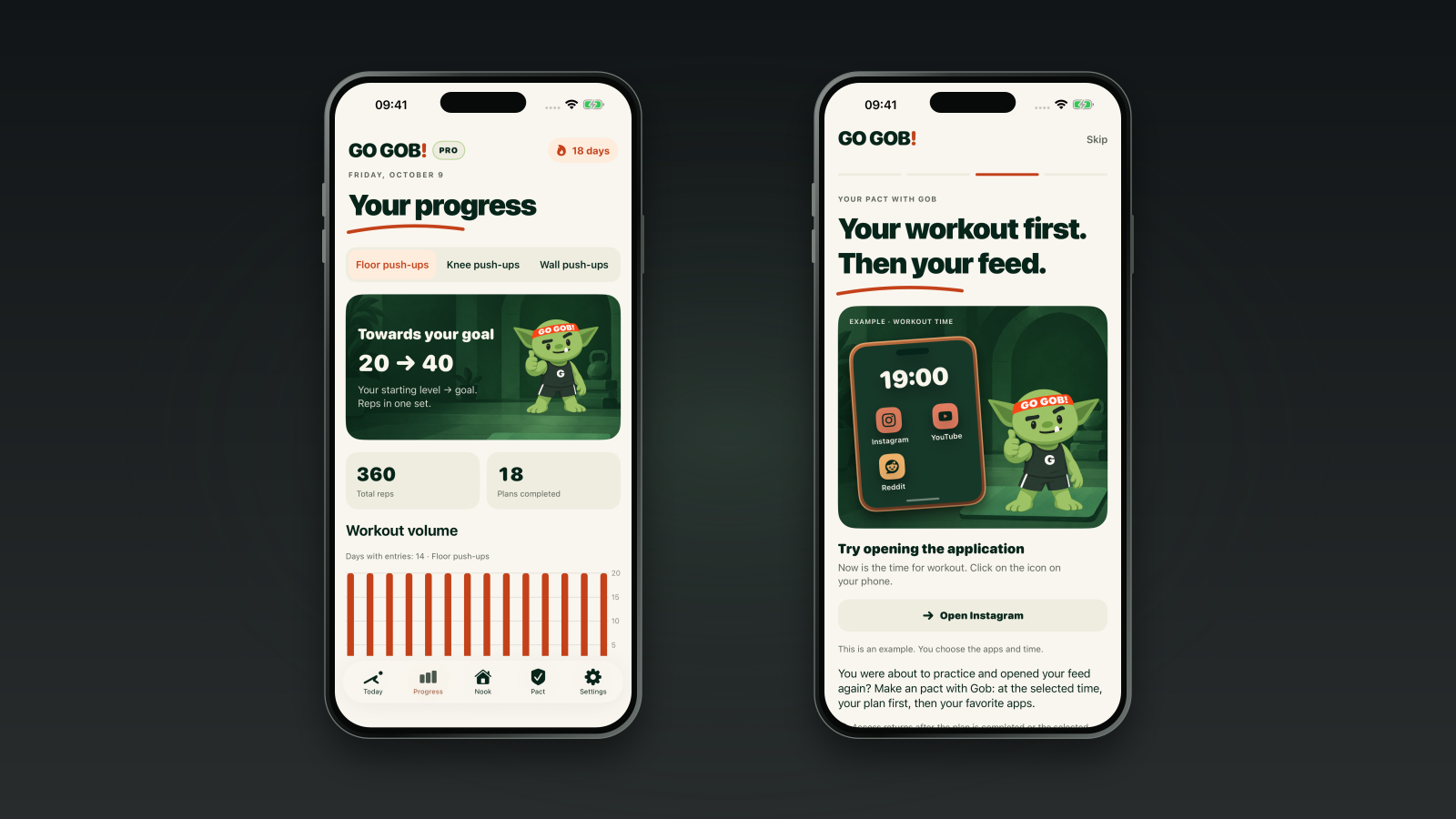
Real Go Gob! screens with example workout data. The Pact shows sample apps and times; you choose your own.
You can export your history as CSV and save a JSON backup. That's handy if you want a separate copy or prefer looking through your records in a spreadsheet. Viewing and exporting your history remain available after free or paid access ends.
Completed training days also add sparks to your fire and unlock things for Gob's corner: a plant, a shelf, a small trophy. His place gradually gets cozier. It's nice to finish a workout and find something new to put in his home.
On rest days, you keep the items and sparks you've earned. Take your planned break. Gob won't ask for his trophy back.
A Pact with Gob: keep social apps waiting until you finish
Here's another moment from that same experience: a little downtime at work, a chance to sit back, and you reach for Instagram or a YouTube video. But the app is blocked because it's your training window under the Pact with Gob.
Ah, fine. I'll do some push-ups.
The block brings back a decision you made earlier: finish the workout, then open the distracting apps.
To turn on the Pact, you choose the apps and your training window. On training days, access stays blocked until you complete your camera-counted plan or the window ends.
If you train at home in the evenings, you can choose that time and the apps you tend to get stuck in. Finish your workout with the camera, and access returns. If you don't finish, the block ends at the time you set.
The Pact uses Apple's Screen Time with your permission. You can stop control at any time. If blocking doesn't appeal to you, you can use the plan, counter and history without a Pact.
Entering reps by hand won't release the blocked apps when you finish a plan. That requires camera counting, so wall push-ups can't be used to complete a Pact.
Seven days to see whether it fits your routine
Go Gob! requires an iPhone with iOS 18 or later. It supports English, Russian, Brazilian Portuguese, Spanish, French, Italian and German.
Full access is free for seven days from your first workout. You don't need to subscribe for that week, and nothing is automatically charged when it ends. You have time to check whether positioning the phone feels practical, whether the plan suits you and whether you want to come back to Gob.
After the free week, new workouts and the Pact require PRO. In the US App Store, subscriptions cost $2.99 a month or $14.99 a year and renew until canceled. There's also a one-time lifetime purchase for $29.99. Local prices apply in other regions; Apple shows the final price before you buy. Purchases and restoring PRO access require an internet connection.
When access ends, you can still view your history and rewards, export your records and stop Pact control.
The goal of 40, 50 or 60 push-ups can stay the same. Your next workout is already in today's plan. Once you've done it, you'll have a result to save and compare with the next session.
Features and access terms: Go Gob! at NovaSynapse. Compatibility and purchases: Go Gob! on the App Store.